AI text detector
AI detector for essays, posts and emails
Paste any text and see how likely it is to be AI-generated, how confident the result is, and how much of it reads as AI, human or mixed.
- One clear result for the whole text
- Confidence level with every score
- Rewrite with Humanize, then check again
What you get with every check
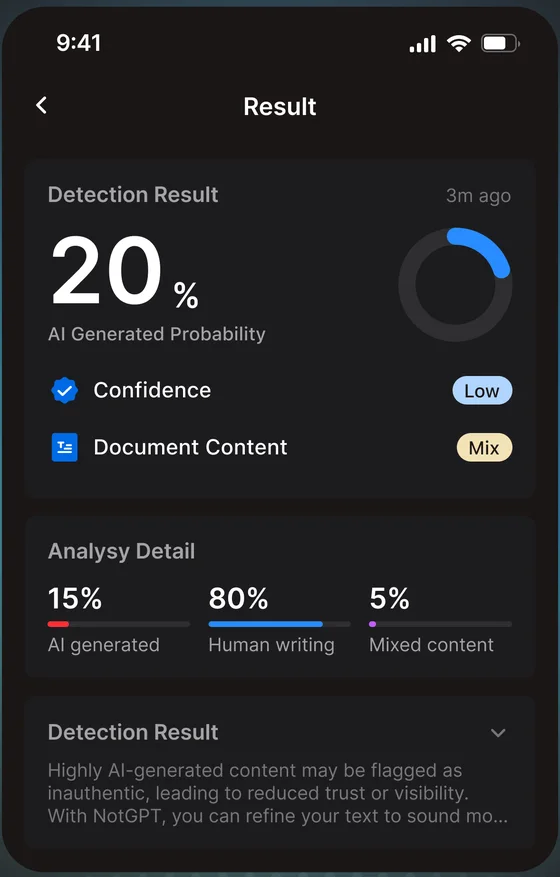
AI-likelihood score
A single percentage from 0 to 100% for how likely the text is to be AI-generated.
Confidence level
High, medium or low, so you know how much weight the score deserves.
AI / human / mixed breakdown
How the whole text splits between AI-generated, human-written and mixed writing.
History
Every check is saved to your account so you can compare drafts. Delete any record anytime.
How it works
- 1
Paste your text
An essay, article, email, post or cover letter. Longer passages give more reliable results.
- 2
Read the result
Check the score, the confidence level and the breakdown together.
- 3
Revise and re-check
Edit the draft yourself or use Humanize, then run the check again.
How to read your score
A detector measures how predictable and uniform writing is. That is a signal, not proof.
Below 40%
Mostly human-like
Little in the text points to AI generation.
40–79%
Mixed signals
Review the text and consider light edits.
80% and above
Strong AI-like patterns
Consider revising, or use Humanize.
AI detection, explained
Is this AI? How to check a text in under a minute
When you look at a piece of writing and wonder “is this AI?”, a detector gives you a fast first read. It works best alongside your own judgment. This routine works for essays, emails, posts and reviews:
- Paste the whole text, not a single paragraph. Detectors are more reliable on longer passages.
- Read the score together with the confidence level. A 70% score with low confidence is weaker evidence than 70% with high confidence.
- Look at the breakdown. Text that is mostly “mixed” often points to AI-assisted editing rather than a fully AI-written draft.
- Check the writing itself for the signs listed below.
- If the result matters, compare it with a second tool and look for context such as drafts or version history.
Common signs of AI-written text
No single sign proves anything, but several together are worth a closer look:
- Very even sentence length and rhythm, paragraph after paragraph.
- Generic statements that could fit any topic, with few names, numbers or concrete examples.
- Stock transitions such as “Furthermore”, “Moreover” and “In conclusion” at the start of many sentences.
- Favourite AI phrases like “delve into”, “a testament to”, “in today’s fast-paced world” and “it’s important to note”.
- Lists of exactly three items, and a tidy summary at the end of every paragraph.
- Confident claims with no sources, or sources that don’t exist.
How do AI detectors work?
Language models write by picking likely next words, so AI text tends to be more predictable than human writing. Detectors measure this in a few ways: perplexity (how surprising the word choices are), burstiness (how much sentence length and structure vary), and classifiers trained on large sets of human and AI writing that learn other patterns.
The result is a probability: how closely the text resembles AI-generated writing the detector has learned from. It is not a record of who wrote the text, which is why different detectors can give different scores for the same passage.
Your text
“AI tools are changing how we draft, revise and share ideas…”
What the detector measures
Predictability
How expected each word choice is (perplexity)
Variation
How much sentence length and structure change (burstiness)
Learned patterns
Features a model learned from human and AI writing
Result
68%
- AI likelihood
- Confidence level
- AI / human / mixed breakdown
How accurate are AI detectors?
Accuracy depends on the text as much as the tool. Detectors tend to do well on long, unedited AI output and on casual human writing. They struggle with short passages, text that was drafted by AI and then edited by a person, and human writing that is very formal or uniform.
False positives are a real problem. Non-native English writers, technical and academic writing, and heavily polished drafts are more likely to be flagged. That is why NotGPT shows a confidence level next to every score, and why no score should be the only evidence that someone used AI.
Read more: Can AI Detectors Be Wrong? False Positives, Accuracy Limits, and What to DoAI detector vs plagiarism checker
People often mix these up, but they answer different questions:
| AI detector | Plagiarism checker | |
|---|---|---|
| What it checks | Whether the writing looks AI-generated | Whether the text matches existing sources |
| Compares against | Patterns learned from human and AI writing | A database of web pages, papers and submissions |
| Result | A probability that the text is AI-generated | Matching passages and where they come from |
| Can flag original writing? | Yes, if it reads as very predictable | Rarely, mostly common phrases and quotes |
A text can pass one check and fail the other. NotGPT is an AI detector; it does not check for plagiarism.
What to do if your own writing is flagged
- Don’t panic. A score is an estimate, not proof.
- Save your evidence: drafts, version history in Google Docs or Word, notes and sources.
- Revise the passages that sound most generic and add specific details from your own experience or research.
- If a teacher or employer asks, explain your process calmly and offer to walk through your drafts.
When people use it
Before you submit
Check an essay or application before a school or employer does.
Before you publish
Make sure a blog post or newsletter still sounds like you.
Reviewing others’ work
Get a second opinion on a submission before starting a conversation.
Checking a message
Get a quick read on an email, review or cover letter you received.
Good to know
- NotGPT gives one result for the whole text. It does not mark individual sentences; to check a section, paste it on its own.
- No AI detector is 100% accurate, and detectors often disagree with each other.
- Formal, heavily edited or non-native writing can score higher than it should.
- Never treat a score as the only evidence that someone used AI.
Frequently asked questions
How does the AI detector work?
It looks at statistical patterns that tend to differ between AI and human writing, such as how predictable the word choices are and how much sentence length varies, and estimates how closely the text matches AI-generated writing.
Which AI tools can it detect?
It is built to check writing from tools like ChatGPT, Claude, Gemini and other AI writing assistants. Results are probabilities and are most reliable on longer passages.
How long should the text be?
Longer is better. A few sentences give a much less stable result than a few paragraphs.
Does it show which sentences look like AI?
No. You get one result for the whole text: a score, a confidence level and an AI / human / mixed breakdown.
Is there a free AI detector?
Yes. NotGPT’s free plan includes 2 checks a day, shared between text and image detection, with no card needed.
Can teachers detect ChatGPT?
Many schools use AI detectors such as Turnitin, and teachers also notice changes in style, missing drafts and generic arguments. A detector score on its own is not proof, which is why keeping your drafts and notes is the best protection.
Related guides
Check your next draft for AI
2 free checks a day · iPhone, iPad and Android