AI humanizer
Make AI-like drafts sound like you
Humanize rewrites text that reads too uniform, at the intensity you choose, while keeping what you meant. Then check it again with the built-in AI detector.
- Light, Medium or Strong intensity
- Keeps your meaning and key details
- Re-check the result in one tap
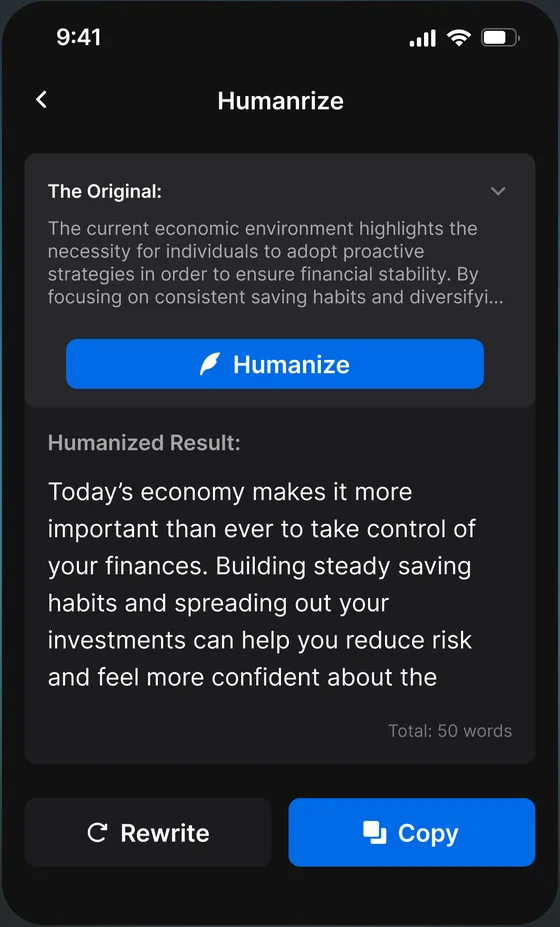
What Humanize does
Three intensities
Light swaps stiff wording, Medium reworks rhythm, Strong rewrites more freely.
Keeps your meaning
The rewrite keeps your point and key details instead of inventing new content.
Built-in re-check
Run the AI detector on the rewritten text to see whether the score moved.
Works with your edits
Use it as a starting point, then add your own examples and voice.
How it works
- 1
Paste your draft
Text you wrote with AI help, or your own writing that reads too formal.
- 2
Pick an intensity
Start with Light and only go stronger if the text still sounds stiff.
- 3
Check again
Run the detector on the new version and keep editing by hand where needed.
Choose how much Humanize changes
One sentence, rewritten at each intensity. Pick the lightest level that sounds right.
Original · Sample
The process of technological evolution continues to accelerate, redefining the boundaries of creativity and productivity across countless domains.
Light
Swaps stiff wording and keeps your sentence structure.
Technological change keeps accelerating, redefining the limits of creativity and productivity in many fields.
Medium
Reworks sentences so the rhythm sounds natural.
Technology keeps speeding up, and it is changing how creative and productive we can be in almost every field.
Strong
Rewrites more freely while keeping your meaning.
Tech moves faster every year. It is reshaping what we can make, and how much we get done, almost everywhere you look.
Humanizing AI text, explained
How to humanize AI text: 7 edits that work
With or without a tool, these edits make AI-assisted writing read like a person wrote it:
- Vary sentence length. Mix short, direct sentences with longer ones.
- Replace generic claims with specifics: names, numbers, dates, places and examples from your own experience.
- Cut stock transitions like “Furthermore” and “Moreover”. Most sentences don’t need one.
- Remove favourite AI phrases such as “delve into”, “navigate the complexities of” and “in today’s fast-paced world”.
- Say what you think. Add an opinion, a reason, or a small admission of doubt.
- Use contractions and plain words where they suit your audience.
- Read it out loud and rewrite anything you wouldn’t actually say.
Phrases that make text sound AI-written
These phrases show up so often in AI drafts that readers notice them. Swap or cut them:
| Instead of | Try |
|---|---|
| “Delve into” | “Look at”, “dig into” |
| “In today’s fast-paced world” | Cut it and start with your point |
| “It’s important to note that” | Cut it; just say the thing |
| “Navigate the complexities of” | “Deal with”, “work through” |
| “A testament to” | “Shows”, “proves” |
| “Plays a crucial role in” | “Matters for”, “helps” |
| “In conclusion” | End on your strongest point instead |
Humanizer vs paraphraser: what’s the difference?
| Humanizer | Paraphraser | |
|---|---|---|
| Goal | Make text read more naturally and less uniform | Say the same thing in different words |
| What changes | Rhythm, sentence structure, stiff or generic phrasing | Word choice and sentence order |
| Best for | AI-assisted drafts and over-polished writing | Avoiding repetition and restating sources |
Neither replaces citing your sources. Rewording someone else’s ideas without credit is still plagiarism.
Do AI humanizers work?
They can make a draft read more naturally, especially text that is stiff, repetitive or full of filler. What they can’t do is add knowledge or experience that wasn’t in the draft, and no humanizer can promise how a particular detector will score the result.
The most reliable approach is to use Humanize as a starting point, add your own specifics, and check the new version again.
Read more: Why AI Humanizers Don't Work: The Real Limits of Rewriting ToolsIs it okay to use an AI humanizer?
Using a humanizer to improve your own writing, fix stiff phrasing or make an AI-assisted draft sound like you is generally fine. Using it to hide that work isn’t yours, or to get around a school or workplace rule on AI, is not. When in doubt, check your institution’s AI policy and be open about how you used AI.
When people use it
Polishing an AI-assisted draft
Turn a generic first draft into something that reads like you.
Over-edited writing
Restore natural rhythm to text that was polished until it sounded flat.
Non-native writing
Smooth phrasing that reads as overly formal or uniform.
Emails and cover letters
Make messages sound personal instead of templated.
Good to know
- Humanize is for improving your own drafts. Don’t use it to pass off someone else’s work or to break your school’s or employer’s rules.
- Always reread the rewrite: check facts, names, numbers and quotes before you use it.
- A lower AI score is not a guarantee about how any other detector will rate the text.
Frequently asked questions
What is an AI humanizer?
A tool that rewrites text so it reads more naturally, varying sentence rhythm and replacing stiff or generic phrasing while keeping the meaning.
Which intensity should I choose?
Start with Light. Use Medium if the rhythm still feels uniform, and Strong only when the text needs a thorough rewrite.
Will the meaning change?
Humanize aims to keep your meaning, but stronger settings change more wording. Reread the result and fix anything that drifted.
Is Humanize free?
Humanize is part of NotGPT Premium, with weekly, monthly and yearly plans.
Can I check the result?
Yes. Run the AI detector on the rewritten text in one tap to see the new score.
Is there a free AI humanizer?
NotGPT’s Humanize is part of Premium. You can try AI detection free with 2 checks a day, and the manual edits in the guide above work without any tool.
What should I tell ChatGPT to humanize text?
Ask for specific changes instead of “make it sound human”: vary sentence length, cut transition words, replace general claims with concrete examples, and keep the original meaning. Then edit the result yourself.
Related guides
Rewrite your next draft with Humanize
2 free checks a day · iPhone, iPad and Android