AI image detector
Check whether an image was made by AI
Upload a photo from your library or take one with your camera, and get the probability that it was generated by an AI image tool.
- Photos from your library or camera
- JPG, PNG and WebP
- A probability score, not a yes-or-no
What you get
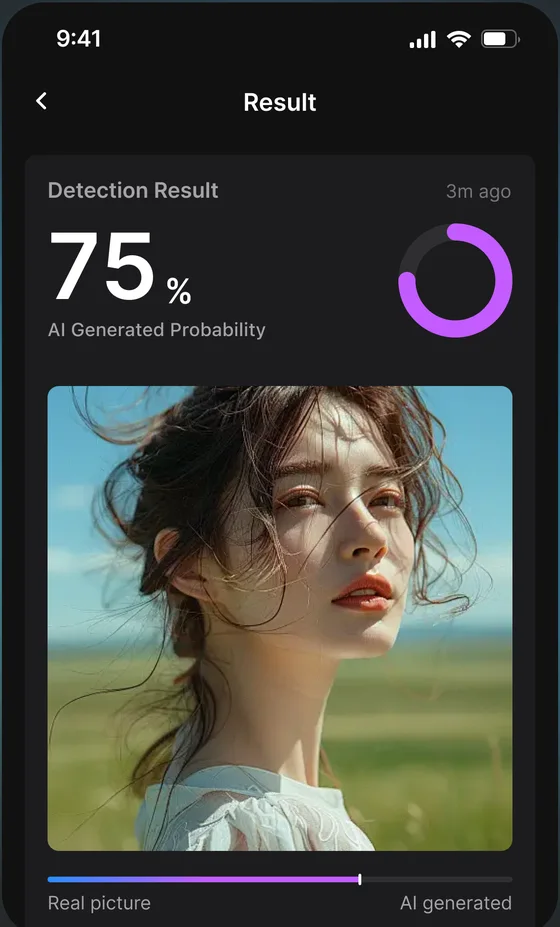
AI-generated probability
A percentage for how likely the image is to come from an AI image generator.
Library or camera
Check a saved image, a screenshot, or a photo you take on the spot.
Common formats
Works with JPG, PNG and WebP images.
History
Results are saved to your account so you can find them later. Delete any record anytime.
How it works
- 1
Choose an image
Pick one from your library or take a photo with your camera.
- 2
Get the probability
See how likely the image is to be AI-generated.
- 3
Check the context
Look at where the image came from and other clues before deciding.
Spotting AI images, explained
Is this image AI? A quick checklist
Run the image through a detector, then look for these signs. Several together are a strong hint; one on its own isn’t.
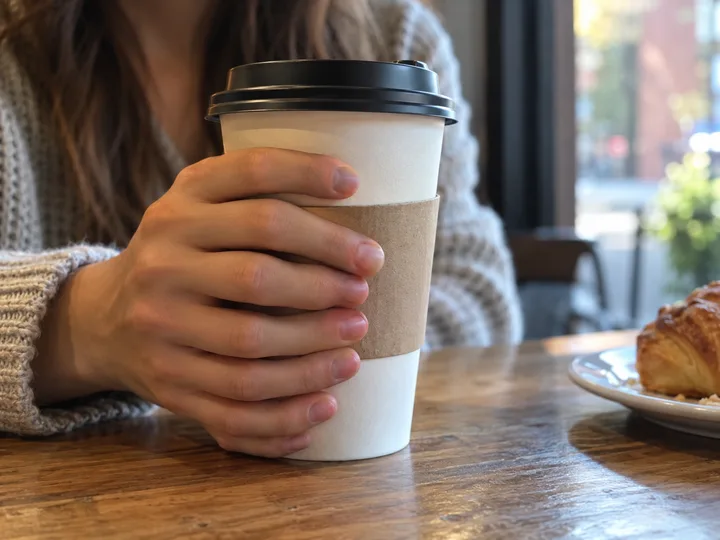
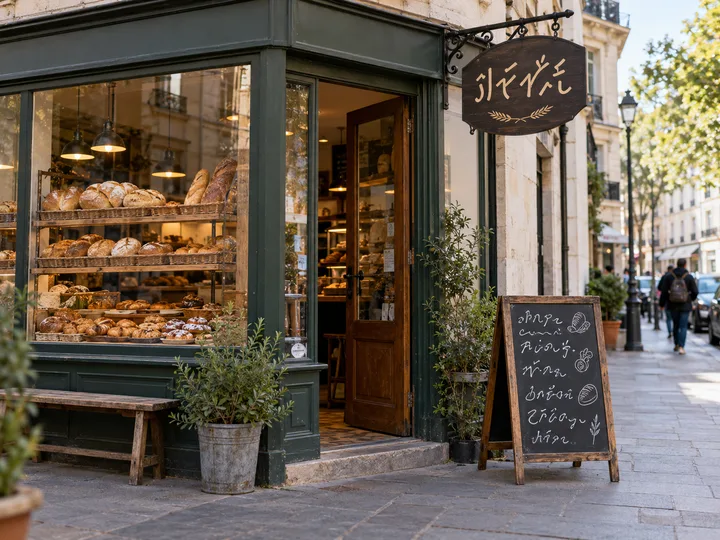
Three images we generated with an AI tool to show what these signs look like. Each one has one deliberate flaw, circled.
 AI-generated example
Hands
Five fingers wrap around the front of the cup. A real hand shows four there, with the thumb on the other side.
 AI-generated example
Lettering
The shop sign and menu look like writing at a glance, but the letters don’t form real words.
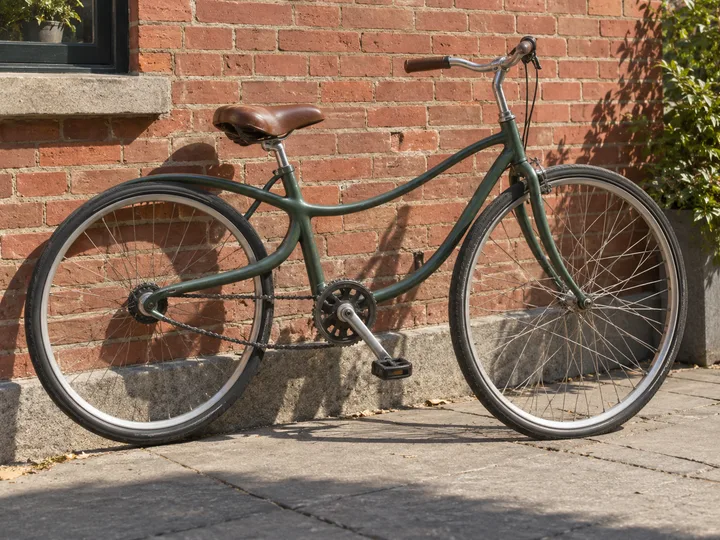 AI-generated example
Structure
The bicycle frame doesn’t hold together: the tube from the rear wheel curves straight into the top tube, and nothing joins the seat to the back wheel the way a real frame does.
- Hands and fingers: extra, missing or merged fingers, odd nails and joints.
- Text and logos: garbled letters on signs, labels and clothing.
- Lighting and shadows that don’t agree with each other.
- Backgrounds that melt, repeat or bend, and objects that merge into one another.
- Objects that don’t hold together: bicycle frames, chairs, fences or jewellery joined in ways that couldn’t exist.
- Skin that is too smooth, and hair that blurs into the background.
- Earrings, glasses and other accessories that don’t match on both sides.
- Reflections in mirrors, windows and eyes that don’t match the scene.
Check where the image came from
- Run a reverse image search (for example Google Lens, Bing Visual Search or TinEye) to find the original and earlier copies.
- Look at the account that posted it first, and whether trusted outlets used it.
- Check the metadata. Some AI tools add content credentials (C2PA) or invisible watermarks such as Google’s SynthID, but a missing label doesn’t prove an image is real.
- Look for other photos of the same moment taken from different angles.
What AI image detectors can and can’t tell you
A detector estimates how much an image looks like the output of AI image generators. It works best on original, unedited images. Screenshots, heavy compression, filters, crops and mixed images (a real photo with AI edits) are harder to judge, and new generators appear quickly.
Treat the probability as one clue, together with the source and the visual checks above.
Read more: AI Generated Image Detector: What It Checks, Where It Falls Short, and How to Use OneChecking illustrations and AI art
Illustrations are harder to judge than photos, because artists also use smooth shading and stylised details. Look at the same details (hands, lettering, symmetry), ask for work-in-progress or layered source files, and compare with the artist’s earlier work.
Read more: How to Tell if Art Is AI Generated: A Visual Detection GuideWhen people use it
Viral photos
Check an image before you share it.
Profile pictures
Get a read on a suspicious profile photo.
Submitted artwork
Get a second opinion on images sent to a contest or class.
Product and news images
Look twice at pictures that seem too perfect.
Good to know
- The result is a probability for the whole image; it does not mark specific regions.
- Heavily compressed, cropped or edited images are harder to judge.
- Combine the score with other checks such as the image’s source and metadata.
Frequently asked questions
Which AI image tools can it detect?
It is built to check images from generators such as Midjourney, DALL·E and Stable Diffusion. Results are probabilities, not proof.
Which file types are supported?
JPG, PNG and WebP.
Is my image stored?
Uploaded images are saved with your detection history so you can review the result, and you can delete them at any time.
Does it detect faces or identify people?
No. NotGPT does not perform facial recognition; it only estimates whether an image was AI-generated.
Can AI image detectors be wrong?
Yes. Edited, compressed or heavily filtered photos can be misjudged in both directions. Use the score together with the image’s source and a visual check.
Can it check videos or deepfakes?
NotGPT checks still images. It does not analyse video.
Related guides
Check your next image for AI
2 free checks a day · iPhone, iPad and Android